Training playbook
The 31-Day Fundraiser Recruitment & Launch Playbook
A practical 4-week pre-launch and 31-day campaign plan for a pick a date fundraiser, built to help you recruit people, launch clearly, and keep the calendar moving.
Who this is for: organizers running their first (or fiftieth) calendar fundraiser. PTAs, faith communities, mutual aid groups, grassroots campaigns, cultural institutions, and community-based nonprofits. The mechanics are the same; the framing differs by audience.
The promise: if you do the work in the next four weeks, you will start your 31-day campaign with a recruited bench, a public goal, a launch email written, and a press of the button that lights up your calendar — not a blank page and a prayer.
Part 1 — The Calendar Math
Most fundraisers fail because the goal was set in the dark. Calendar fundraisers are one of the few formats where you can do the math up front and predict the outcome before you start.
Three numbers you need
- Goal ($G): the total you want to raise this month.
- Average day claim ($D): what a typical donor will give. Use $20 as a planning anchor unless you have prior data.
- Fill rate (F): the share of days you expect to be claimed across all your fundraisers. Use 0.80 as a planning anchor.
One formula
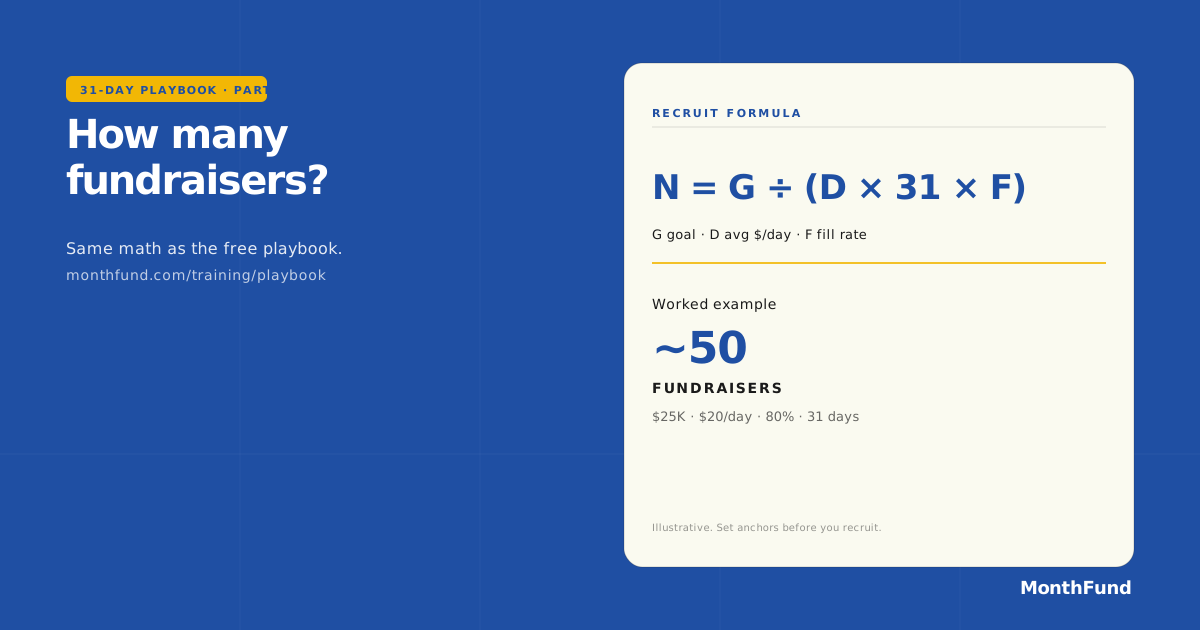
Fundraisers needed = G ÷ ( D × 31 × F )Worked example: a $25,000 goal at $20 average × 31 days × 80% fill = ~50 fundraisers. That is your recruit target. If 50 is unrealistic, halve the goal or double the per-day average. Do not start without an honest answer.
Quick reference table
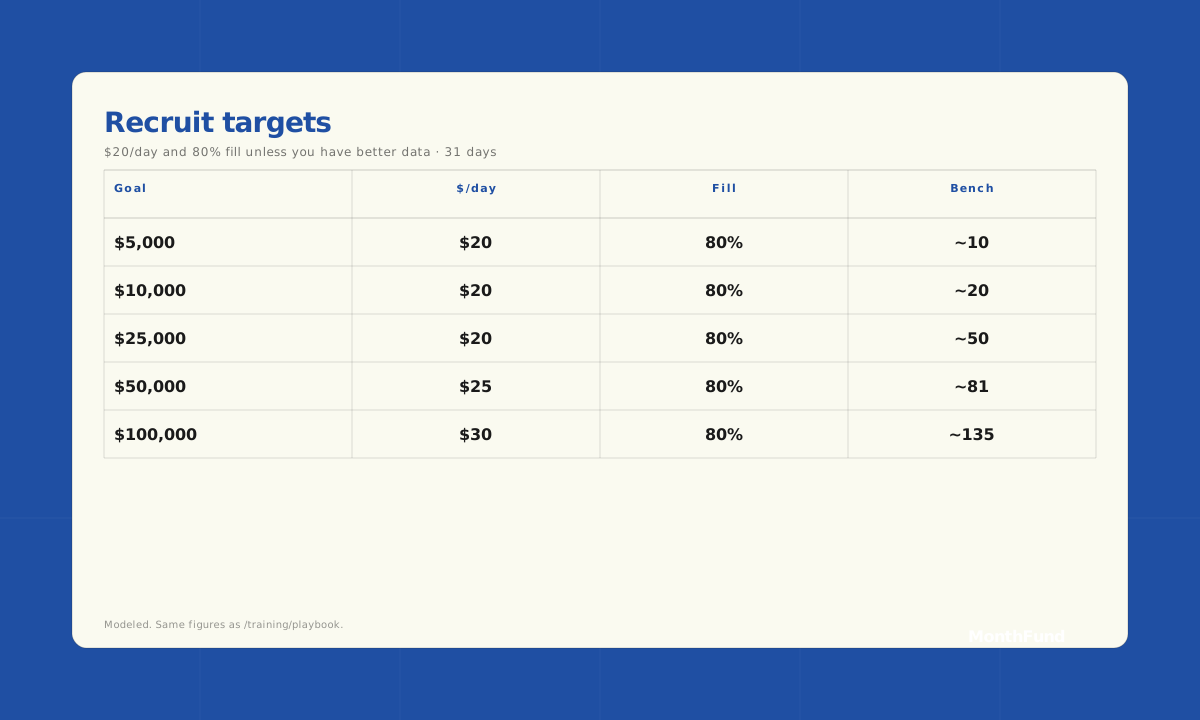
| Goal | Avg $/day | Fill rate | Fundraisers needed |
|---|---|---|---|
| $5,000 | $20 | 80% | ~10 |
| $10,000 | $20 | 80% | ~20 |
| $25,000 | $20 | 80% | ~50 |
| $50,000 | $25 | 80% | ~81 |
| $100,000 | $30 | 80% | ~135 |
Modeled / illustrative; outcomes depend on your network density and recruit motion. Set a defensible target before you ask anyone for anything.
Part 2 — The 4-Week Pre-Launch Countdown
Counting back from Day 1 of the campaign month:
Week –4: Set the goal, draft the bench
Owner: Org admin (you).
- Lock the math. Write
Goal = $X · Fundraisers needed = N · Launch date = Y/Zon a sticky note. - Connect Stripe in MonthFund (10–15 minutes). Nonprofits: email Stripe support with your 501(c)(3) letter for 2.2% + $0.30 rates.
- Draft your fundraiser bench: a list of N names from board, staff, lay leaders, room parents, volunteer captains, repeat donors. Track
Name · Email · Cell · Relationship · Pre-commit. - Pre-commit conversation for the first 5 names. 5-minute call: “We’re running a calendar fundraiser in [Month]. Goal is $X. We need ~N people. Can I count you in?”
- Write the goal sentence. One line you repeat in every email and post: “We are raising $X this [Month] to [outcome] — one day at a time.”
Week –3: Recruit the first half of the bench
Owner: Org admin + 1–2 sponsors.
- Send the recruit email Tuesday or Wednesday morning. Personal, not BCC.
- Follow up by text 48 hours later for non-responders. Email alone runs 20–30% yes; email + text runs 50–60%.
- Create the campaign in MonthFund. Use the early-start toggle if you want loyalists to claim before Day 1.
- Invite the yeses as fundraisers — they get a magic link to set up their page.
- Target: 60% of your recruit number committed by end of Week –3.
Week –2: Recruit the rest + onboard fundraisers
Owner: Org admin + the committed fundraisers.
- Personal nudge: ask each committed fundraiser to bring one more person.
- Send the fundraiser onboarding email with the success checklist link, the public progress page link, and the goal sentence.
- Toggle gamification (Live Activity Ticker + Public Leaderboard) on. These build Week 1 momentum.
- Soft launch to top 5 supporters: let them claim the “big days” ($25, $30, $31) before public launch so Day 1 visitors don’t see an empty grid.
- Target: 100% of your recruit number committed + 90% with personalized pages set up.
Week –1: Pre-launch warm
Owner: Org admin.
- Announcement email to your full house list. Subject: “This [Month] we’re filling a calendar.”
- Social posts Tuesday + Thursday introducing the format. Use the brand-locked training flyers and the shareable playbook SVGs in the “Shareable visuals” section below.
- Board / leadership email with the math and the recruit count. Ask them to forward.
- Schedule the launch email for Day 1, 8:00 AM local time.
- Print the bench list. Personal text on Day 0 evening: “Tomorrow’s the launch — your link is ready: [URL]. You good?”
Part 3 — The 31-Day Launch Cadence
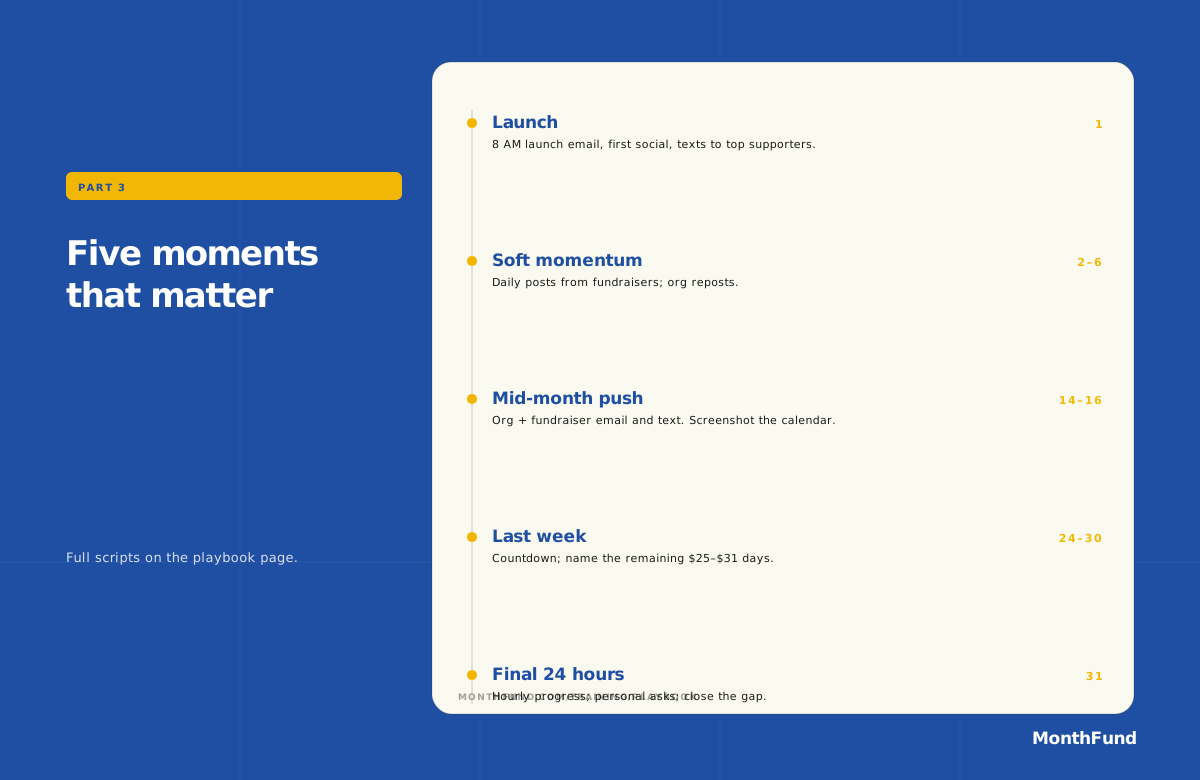
The campaign is 31 days. There are 5 moments that matter.
| Phase | Day(s) | What you do |
|---|---|---|
| Launch | 1 | Public launch email at 8 AM. First social post. First text to top 20 supporters. |
| Soft momentum | 2–6 | Daily personal posts from fundraisers. Org reposts. |
| Mid-month push | 14–16 | The single most important moment. Email + text from org and every fundraiser. “We’re halfway. We’re at X% of goal.” |
| Last week | 24–30 | Daily countdown. Fundraisers ask specifically for the remaining big days ($25, $30, $31). |
| Final 24 hours | 31 | Hourly progress posts. Personal asks to the last 10 supporters. Celebrate the number — or announce the gap and ask for the final push. |
Mid-month push (day 14 evening — day 16 morning)
This is the difference between a $15K result and a $25K result on the same goal.
- Mid-month email Tuesday around 7:00 AM. Subject: “We are halfway. Here is where we stand.”
- Mid-month text to fundraisers with a copy-paste social post.
- Org social post with the running total + a “we need N more days claimed” ask.
- Take a screenshot of the half-filled calendar and post it as the visual.
Part 4 — Copy-Paste Scripts
Use these verbatim. Edit the bracketed parts only.
A. Recruit email (org → potential fundraiser)
Subject: A 5-minute ask
Hi [Name],
We are running a calendar fundraiser this [Month] to raise $[Goal] for [outcome]. The format is simple: each fundraiser shares a personal 31-day calendar; supporters claim a day in their range; the calendar fills up alongside everyone else’s.
I need [N] people to each run one calendar. The lift is real but small: one launch post, one mid-month nudge, one final-day ask. Most fundraisers spend less than an hour over the month and bring in $300–$600.
Would you be one of them? Reply “in” and I’ll send you a link to set up your page in about three minutes.
Thank you,
[Your name]
B. Fundraiser onboarding email
Subject: Your calendar is ready
Hi [Name],
Thank you for being one of our [N] fundraisers this [Month]. Your personal page is here: [URL].
Three things to do today:
- Add a profile photo and a 2-sentence intro about why this cause matters to you.
- Personally text 5 close friends and ask them to claim a day.
- Bookmark the Fundraiser Success Checklist for the 4-week play.
We launch [Day 1 date]. Together we’re after $[Goal]. You are not alone — [N] of us are running calendars side by side.
[Your name]
C. Pre-launch announcement (org → full list)
Subject: This [Month], we are filling a calendar.
[One opening line about the mission outcome.]
We are raising $[Goal] this [Month] for [outcome] — one day at a time. Here’s how it works: [N] of our supporters are each running a personal donation calendar. You claim a date, you give that amount, the calendar fills up.
See the calendar and meet the fundraisers: [Org page URL].
The first day is [Day 1 date]. Watch your inbox.
D. Mid-month push (org → list)
Subject: We are halfway. Here is where we stand.
We are 15 days into the [Month] calendar fundraiser. [N] fundraisers, $[Raised] raised, [P]% of our $[Goal] goal.
We need [N_days] more days claimed to hit the number. The cheapest open days are $[low]–$[mid]; the “big days” left are $[high].
If you have been meaning to claim a day, today is the day to do it: [Org page URL].
E. Day-31 final ask
Subject: 4 hours left, $[Gap] to go.
We are $[Gap] away from our $[Goal] goal with [hours] hours left. The remaining open days are [list of $ amounts]. If one of them is yours, this is the moment: [URL].
Thank you, either way. We will tell you exactly where we landed tomorrow morning.
Part 5 — The Fill-Rate Scorecard
Run this weekly during the campaign. It is the single dashboard view that tells you whether you are on track.
| Metric | Wk 1 | Wk 2 | Wk 3 | Wk 4 |
|---|---|---|---|---|
| Fundraisers with ≥1 day claimed | 70% | 90% | 95% | 100% |
| Days claimed across the campaign | 20% | 50% | 75% | 95%+ |
| % of goal raised | 20% | 50% | 75% | 100% |
| Public-progress page views | 200 | 500 | 1000 | 1500 |
| Fundraisers who posted this week | 50% | 60% | 60% | 70% |
If you are off-pace on row 1 (fundraisers with ≥1 day claimed) at the end of Week 1, that is the most important fix — those fundraisers are not active and will not become active without a personal call.
Part 6 — Quick FAQ
- Why 80% fill rate?
- 80% is the planning anchor that separates an honest goal from a wish. Top-decile teams hit 95%+; first-time teams more often land at 65–75%. Plan for 80%, celebrate if you beat it.
- What if I cannot recruit N fundraisers?
- Cut the goal. Calendar fundraisers are a recruit motion first; resist setting a goal that requires fundraisers you do not have. A delivered $10K goal is worth more than a missed $25K goal.
- Do I have to use MonthFund?
- No. The playbook works with a spreadsheet, a Google Doc, or a wall calendar. MonthFund just removes the work of building the page, collecting payment, sending donor receipts, and showing public progress.
- What about recurring donors?
- Calendar fundraisers convert beautifully into recurring donors at the close. The final-day email is “thank you for claiming Day X — would you make $X recur monthly?” Plan that follow-up the day after Day 31, not three weeks later.
Appendix: The “Big Days” psychology
The reason $25, $30, and $31 days are the hardest to clear is not that no one will pay $31 — it is that no one defaults to $31. The default behavior of a calendar visitor is to scan, pick a date that resembles their birthday or anniversary, and click. That date is rarely $25 or higher.
The solution is to name the big days. In Week 4, your fundraisers’ asks should say “the remaining open days are $25, $30, and $31 — would you take one for [name]?” This converts the ask from “donate” to “claim the day named after [something].”
Appendix: When to repeat
Calendar fundraisers compound because the recruit motion (the hard part) gets cheaper every time. Your second month requires ~30% of the recruit effort of your first; your third requires almost none. By month four, you have a self-sustaining motion.
The trap is letting the campaign go cold between months. The play is to announce the next month’s campaign on the morning after Day 31 — “We raised $X this [Month]. Here is the next $X we’re going after, starting in two weeks.” That email keeps your bench warm.
Shareable visuals (SVG)
These match the tables and cadence on this page. Use them in social posts, slides, board packets, and Week –1 announcements (same palette and type stack as training flyers). Export to PNG in Figma or Chrome if a platform requires raster.
- Calendar math card (1200×630) — formula plus the $25K / $20 / 80% / ~50 fundraisers worked example. Good for OG images and link previews.
- Recruit target table (1200×720) — the full quick-reference grid from Part 1.
- 31-day cadence strip (1200×780) — the five moments from Part 3 for trainer slides or carousel page 1.
Regenerate from the repo: node scripts/generate-training-flyers.mjs (writes to public/training-playbook-graphics/).
Per-audience templates
The scripts above are the universal motion. The Templates library adapts the core messages for specific audiences, including parent letters for PTAs, bulletin inserts for faith communities, activation emails and social threads for grassroots campaigns, mobilizer messages for mutual aid, and community fundraiser invitations. Every template is ready to adapt in the canonical templates library.
Browse templatesNeed a live walkthrough?
Join the free training every Friday, 2:00–3:00 PM Central (12 PM Pacific · 1 PM Mountain · 3 PM Eastern). Next up: Friday, October 23, 2026. 30 minutes of the worked example, 30 minutes of open Q&A. Recording included.
Built by MonthFund. This playbook is free to use, share, and adapt — credit appreciated, attribution not required.